
Our team: an internal case study
How our team runs rental operations with PLUBOX
Published · English
BARKAR_OD is the rental-operation workspace used by the team behind PLUBOX. This internal case describes how the team handles price updates, owner reports and cleaner handovers, with its own estimates for two recurring jobs.
1. Two tasks, two team estimates
The team described these examples for a portfolio of about 30 apartments. The figures are estimates from an interview on 28 October 2026, without independent timing. They describe this team's experience after setup; the time another business needs will depend on its configuration, records and scope of work.
| Task | Previous process | With PLUBOX |
|---|---|---|
| Updating prices for the year ahead | About 8 to 9 hours, including revisions | About 15 minutes using the PLUBOX connection in ChatGPT |
| Preparing owner reports | A full working day | About 5 minutes after setting up the allocation rules |
2. Making requested price changes through ChatGPT
The team uses the PLUBOX connection in ChatGPT to add or update expense and utility-payment records and request calendar price changes. This gives the manager a way to work with operational data through the assistant, within the connected account's permissions.
For the year-ahead pricing task, the team says the work now fits between other jobs. Larger updates can involve several operations. The manager checks the properties, dates and values as changes are applied in steps and stays responsible for the pricing decisions.
The 15-minute estimate concerns this requested price-update workflow. No revenue increase or change in occupancy was measured for this case.
3. Preparing reports after the allocation rules are set
Previously, preparing the owner reports involved a full day of manual work, with opportunities for a mistake at different stages. The team now sets up its revenue and expense allocation rules to match the way it manages the properties, including percentage-based shares.
Managers record expenses and review the resulting allocations and owner figures in PLUBOX. Once the rules are configured, the team estimates that preparing the comparable reports takes about five minutes. Initial setup and ongoing recordkeeping were not timed separately.
The team describes the process as easier to control. An error-rate reduction was not measured, so the case does not attach a number to that improvement.
4. Giving a changing cleaning team current information
Cleaning is one part of a wider coordination problem. People leave, return or join the team, and the manager used to repeat directions, key and lockbox details, checkout times and the next arrival time. A list sent the previous evening could need to be sent again when the plan changed.
The team now uses the cleaner's app to make the property information, current assignments and stay times available to staff. Cleaners can identify the apartment and check the information they need for the handover. The manager describes less repeated explanation and manual coordination.
- Identify the assigned apartment
- Check the available directions, key and lockbox instructions
- Review checkout and the next arrival time
- Check the current assignment when the plan changes
5. Following booking changes and recorded payments
The team previously opened sales channels manually to look for booking changes. It now uses its configured connections to bring supported updates into PLUBOX. Channel coverage and update timing depend on the connection in place.
The team also uses the guest's recorded payments and balance to follow the state of a booking. Previously, repeated checks and the risk of forgetting an amount made this harder when several people were involved. The reported benefit is a shared view of the recorded account, rather than relying on one person to remember each detail.
6. Source and scope of this case
This is the PLUBOX team's own use case, not an independent customer endorsement. Source: the team interview about BARKAR_OD on 28 October 2026. The timing examples refer to about 30 apartments and remain the team's estimates.
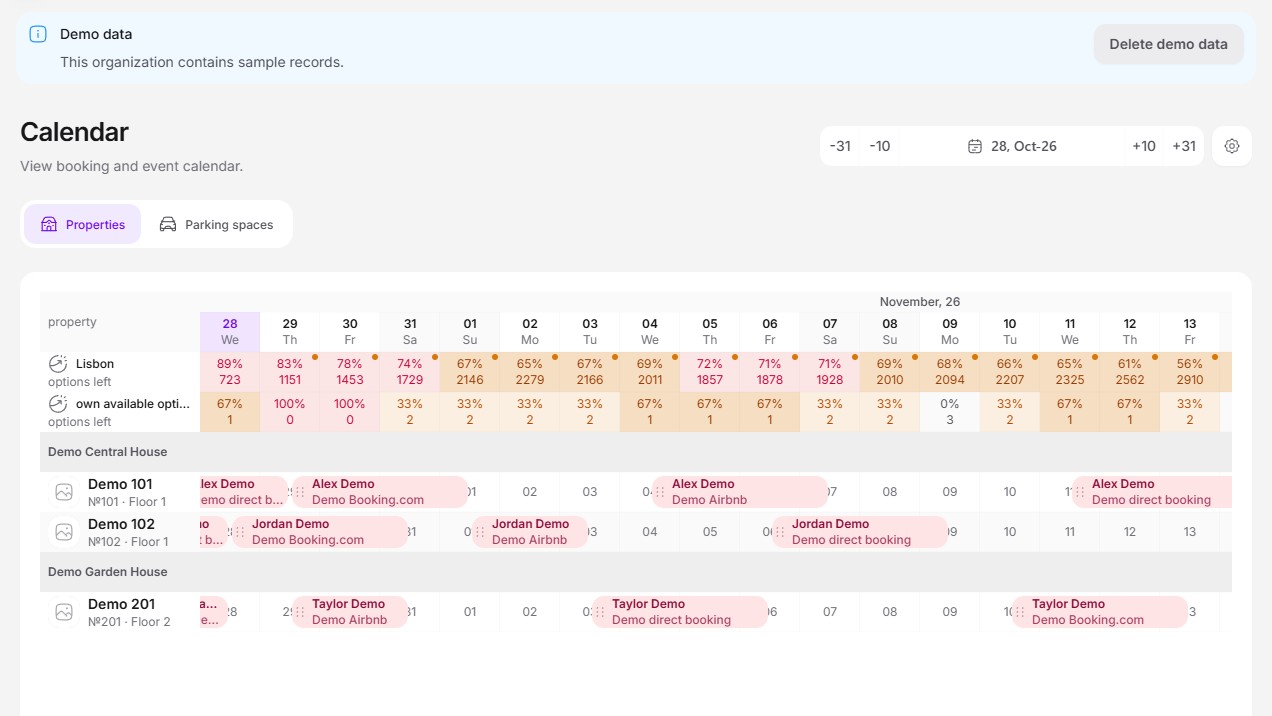
The earlier working day was not defined in hours, so no percentage saving has been calculated. The calendar illustration uses demonstration records. It does not display the team's live bookings, guest details or access information.
See these workflows in PLUBOX
Request a walkthrough using your property count, sales channels and owner-reporting model. Tell us which part of your current process you want to try.