
Bookings and guest details
The calendar and daily schedule lead to the reservation behind each stay. Staff can find the dates and unit without searching through messages.
Daily rental operations
PLUBOX brings bookings, cleaning, tasks and financial records together for teams managing 10+ short-term rental properties. Start with today's stays, assign the work and keep the records you will need at month end.
Select today and find the arrivals and departures. Open a booking to check its unit, dates and guest details. Note any change that affects the cleaning window.
Assign the cleaners and follow each job's status. Put a repair or missing item in a task so someone owns the work before the next guest arrives.
Record payments and property expenses, then list anything still open. Give the next person the property, issue, responsible colleague and next action.
Demo data · actual PLUBOX interface
The daily view lists check-ins, check-outs and in-house stays. Open the relevant booking before assigning the work for that property.
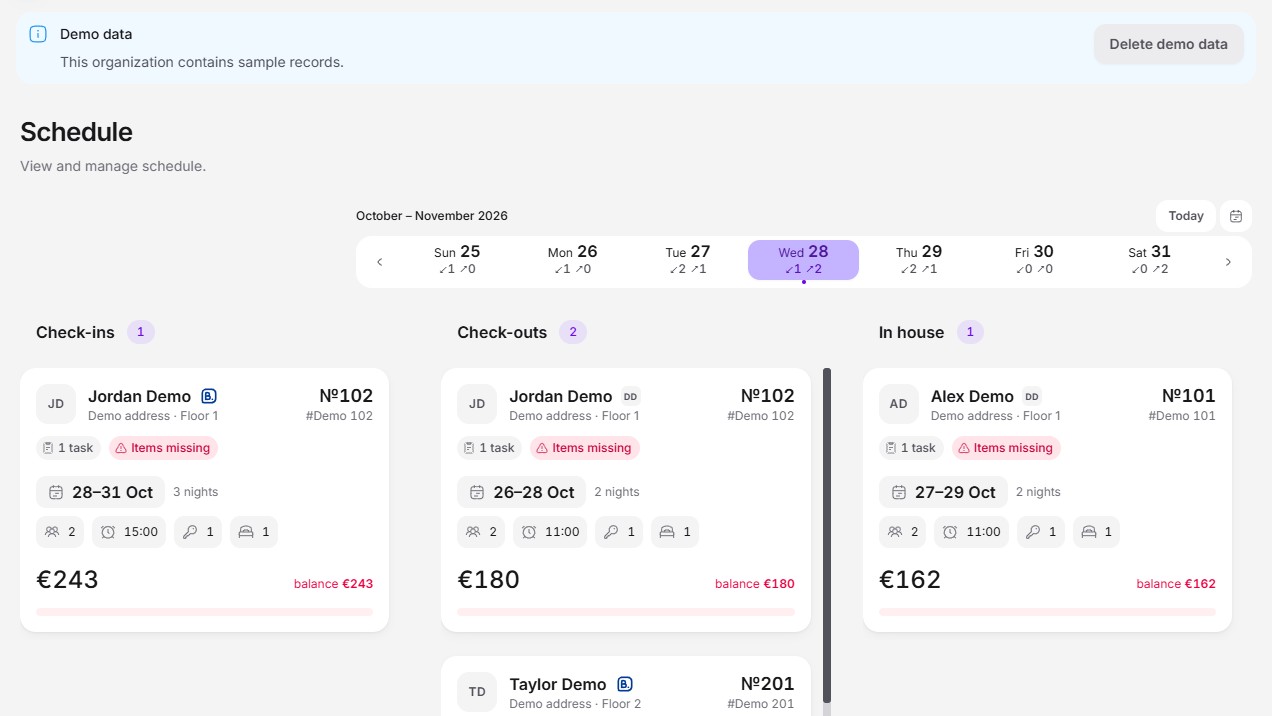
The calendar and daily schedule lead to the reservation behind each stay. Staff can find the dates and unit without searching through messages.
Each cleaning has an employee and status. Tasks hold the extra work, from replacing a key to checking a repair.
Payments and expenses stay with your property operations. Use those records when an owner asks about income, costs or their remaining balance.
Yes. When creating an organization, choose demo data to explore sample properties, bookings, cleanings and tasks. Follow the removal warning when you are ready to delete those examples.
PLUBOX has web and mobile apps. Staff access follows their roles and the accounts they can work with; owners have access to their linked properties.
Start with one day's arrivals and departures, assign its cleaning jobs and add the unresolved property tasks. Once the team can follow that day, bring in the remaining properties and financial records.
Create an account with demo data, or ask us to show the parts your team needs first: bookings, cleaning, tasks or owner reports.